
Reducing Time-to-Insight in Company Financial Data by 90%
How people in SoftwareMill went from writing complex SQL queries to asking questions in plain English.
Overview
This article documents the transformation of financial data access at SoftwareMill through FinBot - an AI-powered natural language interface to BigQuery financial data. The narrative arc follows the before-and-after pattern, demonstrating measurable productivity gains while providing technical depth for engineering audiences.
The problem
Every quarter-end, month, or sometimes more frequently, our financial team receives a barrage of questions about our financial status for various projects or how it compares to the previous year or quarter. We have a large amount of data about our projects, and most of this data lives in BigQuery.
To find specific details or produce a report when someone asks for specifics can be troublesome, and you need to know BigQuery yourself or just wait for other people to analyze the data for you. Finding data in this dataset usually takes multiple iterations, wasting time and leading to delayed decisions, bottlenecks, and frustrated managers.
The old way
Assuming you are one of the individuals who went through the layer of administration and security and got your access to the BigQuery tables where our financial data resides, that’s just the beginning of your problems.
Typically, people interested in this data are not programmers, and even if they are, not all programmers are accustomed to how BigQuery works. There are multiple tables collecting data from different sources for reporting purposes. However, if existing reports don’t suit your needs, you may need to overcome some technical barriers to understand what is what within the dataset.
Some of those include:
- BigQuery SQL syntax requirements
- Complex table relationships
- Not intuitive column naming conventions:
a)sales_value_PLNvscosts_value_PLN
b)speciality_groupvsspecialty(note spelling)
c)profit_center= project name - Temporal logic complexity:
a) Q1 = months 1-3, Q2 = months 4-6, etc.
b) Year/month/period columns need correct filtering - Multi-currency handling (PLN, USD)
Typical query workflow (before)
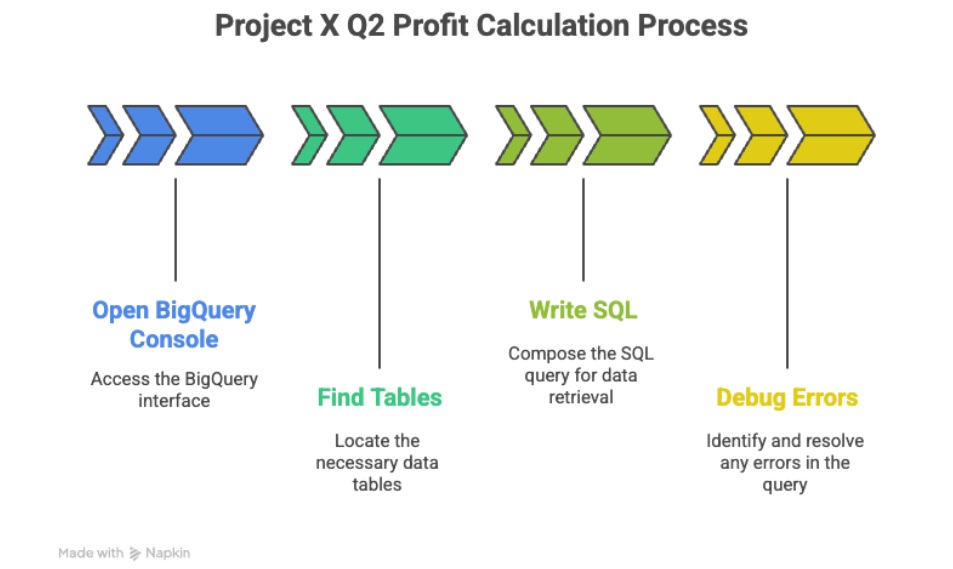
If you are a person not using this dataset often, every time you open up the BigQuery console you basically go through the same flow:
- User wants: "How much did we make on Project X in Q2?"
- Step 1: Open BigQuery console (1-2 min)
- Step 2: Remember/look up table names (2-3 min)
- Step 3: Write initial SQL:
SELECT SUM(sales_value_PLN) FROM olap_cube
WHERE profit_center = 'Project X' -- Wrong name?
AND quarter = 2 -- No quarter column!
AND year = 2025
- Step 4: Debug errors (3-5 min)
- Column doesn't exist
- Need month BETWEEN 4 AND 6
- Profit center name doesn't match exactly
- Step 5: Iterate 2-3 times (5-10 min)
- Step 6: Format results manually (2 min)
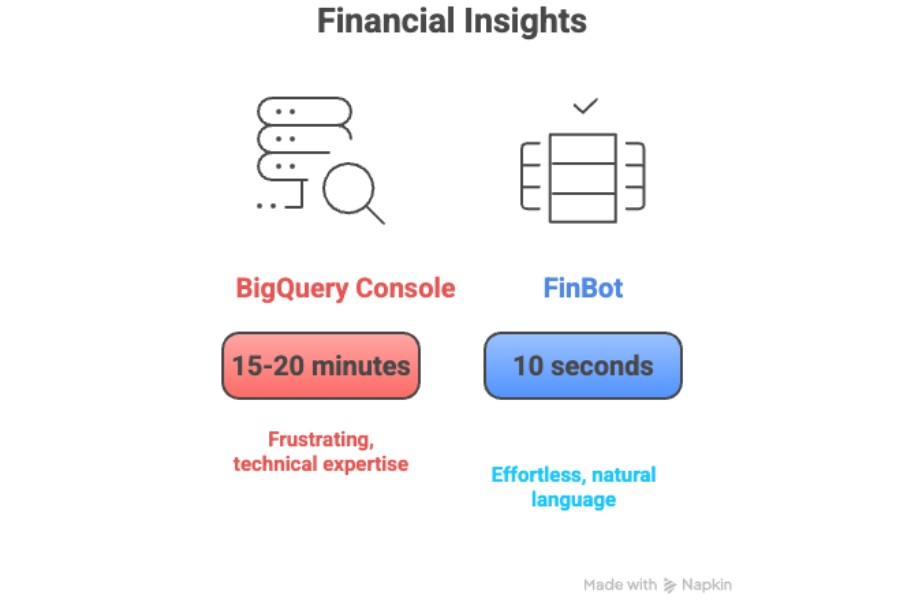
- Total: 15-20 minutes for one answer
The eight steps listed above scream frustration, and it's one of the reasons our CFO is a busy man. If you are one of the people who needs quick margin checks or other ad-hoc analysis, you are doomed. Either you master the dataset, or you wait.
Real examples of query complexity
To put a picture of what exactly the problem is, have a look at a simple query someone could want to execute against the dataset: "What was our revenue last quarter?"
To resolve that you need to prepare the following query in Google console:
Required SQL:
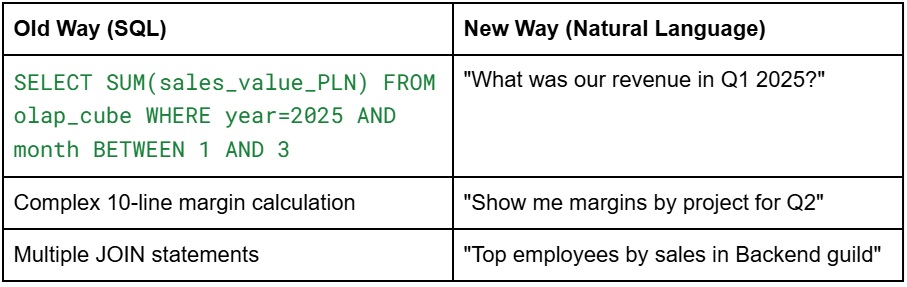
SELECT SUM(sales_value_PLN) as revenue FROM `project.dataset.olap_cube` WHERE year = 2025 AND month BETWEEN 1 AND 3
Another one would be, eg:, "Top 5 contractors by margin in Backend guild"
Required SQL:
SELECT employee, SUM(sales_value_PLN) as sales, SUM(costs_value_PLN) as costs, (SUM(sales_value_PLN) - SUM(costs_value_PLN)) / NULLIF(SUM(sales_value_PLN), 0) as margin FROM `project.dataset.olap_cube` WHERE guild = 'Backend' AND year = 2025 GROUP BY employee ORDER BY margin DESC LIMIT 5
If you are a software developer with minimal experience, those queries don’t look very complex, but for many people in the organization, especially nontechnical ones, building queries like this means hours wasted weekly across the whole organization, builds ‘SQL-capable’ team members dependency and, even though we have open data for everyone to see, the self-service analytics is a myth.
The solution (FinBot introduction)
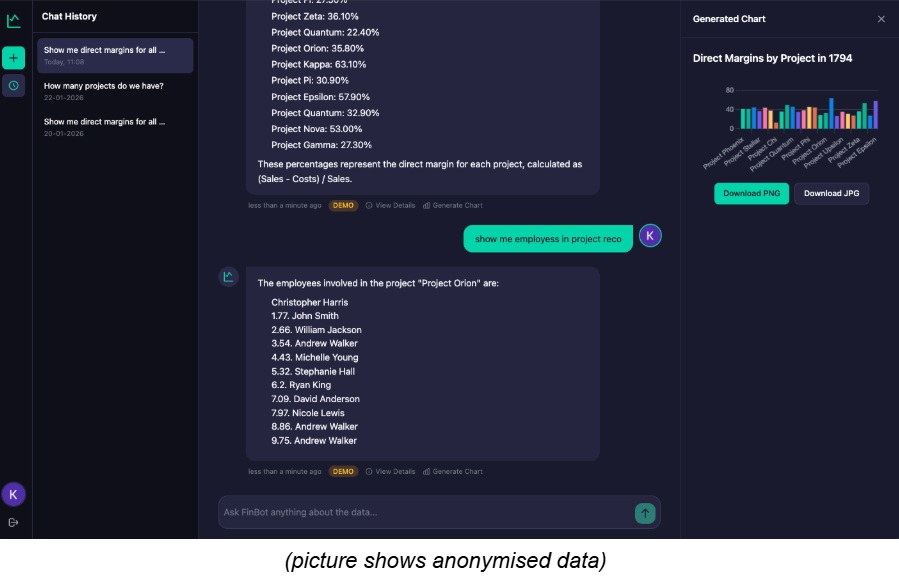
Instead of asking our CFO what the top 5 contractors by margin are this year in some department so that he can sit down and translate that for us in the BigQuery console, we could simply send the same question to a chatbot and get the answer. That means true self-service for everyone interested in this data, not just data engineers or programmers.
The vision for the project was to resolve any ambiguities automatically and get answers within seconds, not minutes, hours, or days. You should be able to ask questions like you would ask your colleague and not worry that you don’t know everything about the data - if our bot cannot figure out what you mean, it will ask additional questions - just like our CFO.
What FinBot is?
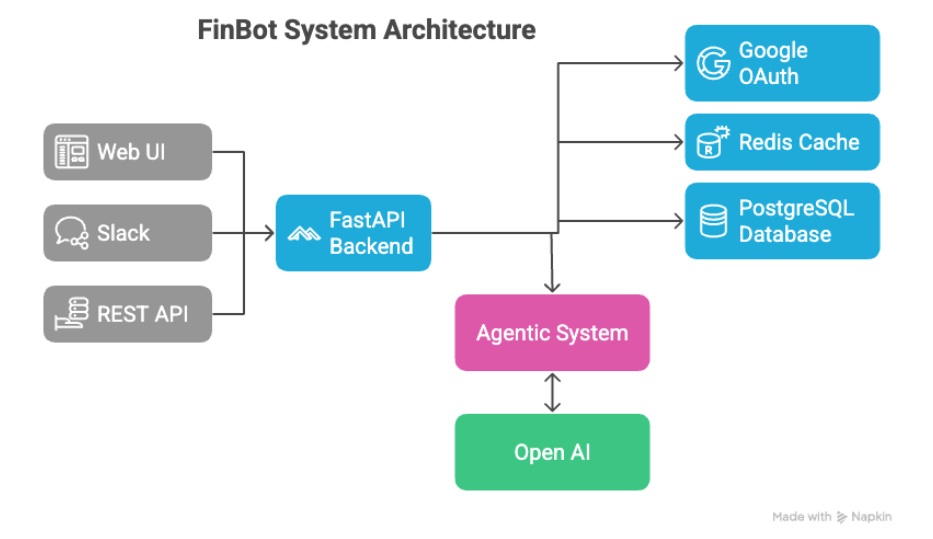
FinBot is the latest project from SoftwareMill Innovation Hub (SoftwareMill’s division for testing and implementing ideas around AI). The tool is a financial analysis assistant built with LangChain and LangGraph for agent orchestration, as well as Google BigQuery MCP to execute queries against our data source via agents.
FinBot is built on:
- FastAPI (Python 3.10+) for REST API
- LangChain + LangGraph for agent orchestration
- GPT-4o for natural language understanding
- Google BigQuery for data source
- Redis for caching
- PostgreSQL for conversation persistence
And is available via:
- Web chat interface (SvelteKit)
- REST API
Architecture at glance
The main challenge for this project was to design an architecture that would not only pass the user input into a BigQuery MCP server but also create an agentic flow that would preprocess the user query and enhance it with additional properties so that the final SQL Agent would produce the queries we actually want.
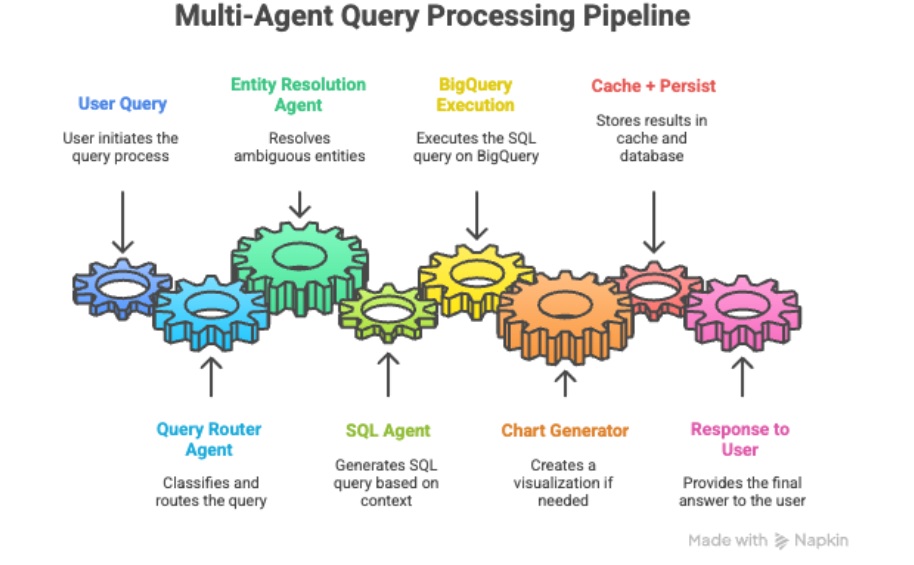
For this purpose, a special multi-agent pipeline was created (described in Section 3), which helps identify the type of request, how it translates to the actual data in the database, and what should be produced as the final output. Additional components were added to assist multi-agent components with caching, graph production, and improved context understanding.
An essential component of this system is also the integration with Google SSO so that only people within our organization can access this data. The persistence layer, with a simple Postgres database, serves only the purpose of storing users' conversations, allowing each user to browse previous results, regenerate graphs if needed, etc.
Technical deep-dive
Multi-agent architecture
To make the FinBot chat interact with real users’ queries, we cannot simply send the data to an SQL agent that translates those queries into BigQuery SQL. That would work only if users were aware of how data is stored in our datasets, what columns we have and what’s inside them.
Consider the following simple user input "Show me all projects Krzysztof Grajek worked on in 2025", this has very little chance to be translated to proper SQL query for multiple reasons, first of all the dataset has no column named project(s), in our database the projects are stored in a column named profit_center (for some historical reasons), another problem is that we don’t have an person with name ‘Krzysztof Grajek’ - we do have however an person named ‘Grajek Krzysztof’ - the name is reversed with a surname first - you get the idea.
Another aspect is that our FinBot must be conversational. If we ask a follow-up question, such as "and Jan Kowalski", it must be aware of what we were asking before so that it can add context and build a proper query for us from just this piece of information.
For this, we created a multi-agent flow that attempts to resolve multiple pieces of information so that they can be collected together and sent over to the SQL Agent to generate the most appropriate query. The agents taking part in this workflow are described below.
Query router agent
The first line of processing is a classifier; some queries don’t need to end up in the SQL agent, and we can short-circuit that to get the results faster.
The query router agent classifies query type:
DATA_QUERY- needs SQL executionMETA_QUESTION- about previous resultsEXPLANATION_REQUEST- how was it calculatedCLARIFICATION- modifying previous queryGENERAL- no SQL needed
When we detect, eg., GENERAL query type when the user asks for the weather, we will behave like a normal chatbot similar to ChatGPT.
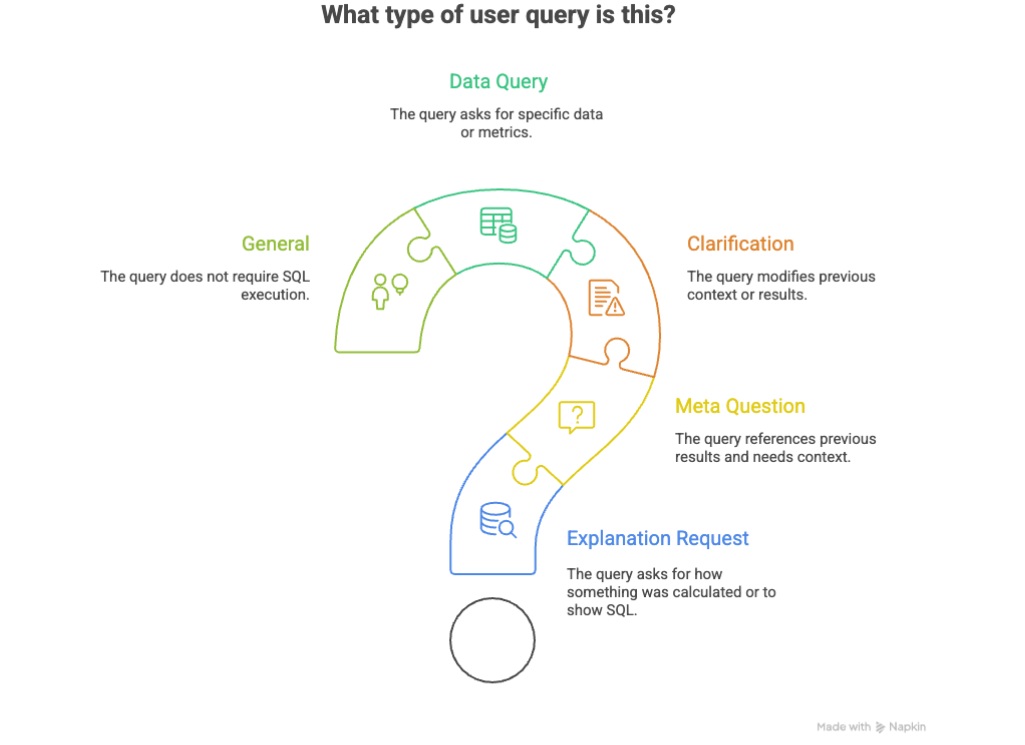
The query router agent determines if entity resolution is needed (by another agent in the flow), extracts preliminary entities if necessary, and identifies whether some grouping of data will be required with a group_by_hint for aggregations, etc.
Preliminary entity extraction is executed against the static knowledge base we have as part of the FinBot internals, eg., The project is translated here into profit_center, other, more complicated scenarios with entities, are resolved in Entity Resolution Agent if needed.
Example classification:
- Input: "Show me direct margins for all projects in 2025"
- Output:
{query_type: "DATA_QUERY", group_by_hint: "profit_center", needs_entity_resolution: false}
Entity Resolution Agent
Entity Resolution Agent is the one solving our problem with data we store against data the user asks about. A perfect example of this is the person name. We can ask about ‘Krzysztof Grajek’, ‘Grajek Krzysztof’ or just ‘Grajek’ and we want to resolve this to the exact piece of data we have in the database so that the filtering in BigQuery SQL (WHERE employee = ‘Grajek Krzysztof’ will be created. The same applies to project names, specialities, division names etc.
The agent executes fuzzy matching against knowledge bases it builds on the data itself, example sources for those are:
- Contractors list from database
- Profit center (project) names
- Guild names
- Specialty groups
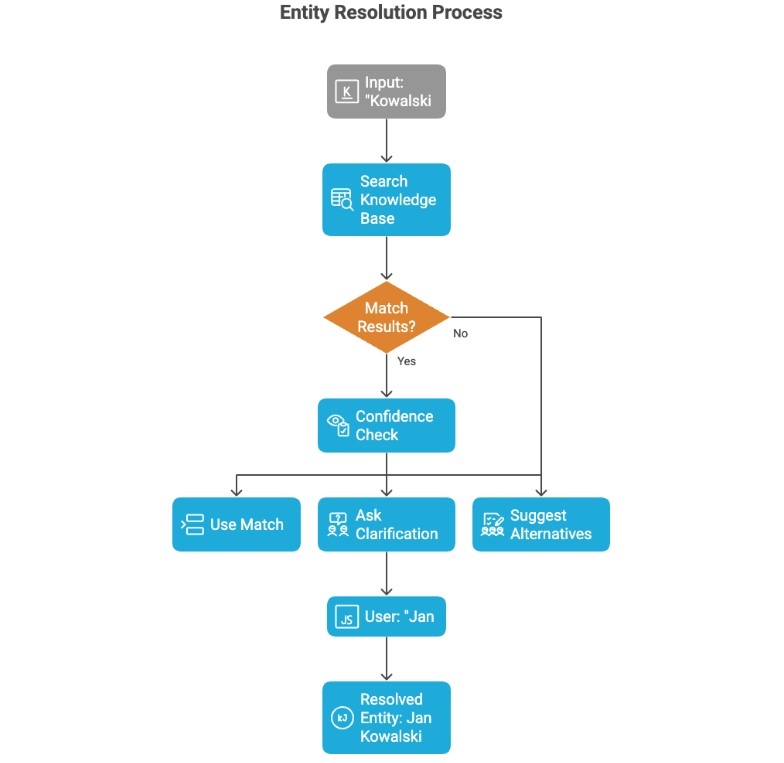
If the entity cannot be resolved, this agent is responsible for short-circuiting the flow and asking clarifying questions when ambiguous. For example, when we ask for person named ‘Krzysztof’, but we have multiple records for that first name the agent will try to clarify what exactly we need:
- "Did you mean 'Krzysztof Grajek' or 'Krzysztof Kowalski'?"
The agent returns confidence scores, and if those scores fail to meet a certain threshold, the workflow to obtain the actual results is interrupted.
SQL Agent (Core Engine)
SQL Agent is the most important component in our agentic system. It is the one responsible for running the actual queries against Google BigQuery.
This agent is LangChain's create_sql_agent with openai-tools type. We use GPT-4o model (temperature=0 for determinism) and generate a system prompt with the following details:
- Complete schema documentation
- Business context (metric formulas, terminology)
- Query patterns and examples
- Temporal mapping (Q1-Q4)
- Security constraints (SELECT only)
The agent enriches the context with data like (year, quarter, month, department), and injects the conversation history and resolved entity hints.
The agent was built in a way that allows us to extract the exact SQL query from the execution trace, which is important for some of the end users when they want to make sure the calculations were done on proper data in our datastore.
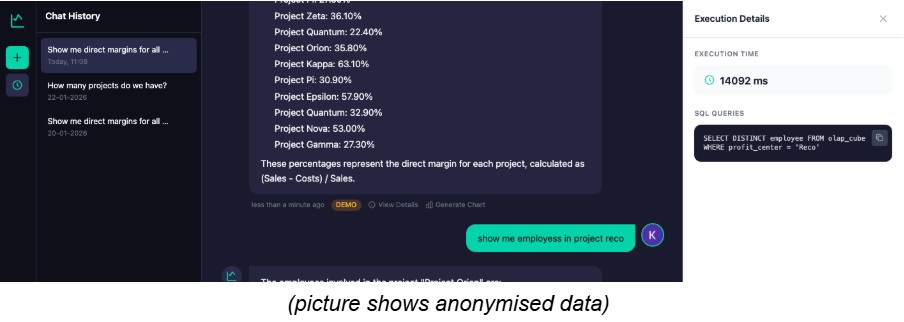
Chart Generator Agent
One of the latest additions to our tool is the ability to generate charts for specific data retrieved automatically with FinBot . For this, we created a small utility agent that sends retrieved data on request and produces nice-looking graphs.
The agent analyzes response text and determines appropriate visualization techniques automatically. It supports bar, line, pie, doughnut and table formats. The agent outputs Chart.js compatible JSON used later on FinBot UI for presentation purposes.
Prompt engineering details
Business context injection
As mentioned briefly above, the query entered by a user gets enhanced with additional context. With agents, we try to embed some bits we already know from domain knowledge, including:
- Business glossary terms
- Metric formulas (e.g., margin = (sales - costs) / sales)
- Common query patterns
As well as some terminology mappings eg:
- "revenue" →
sales_value_PLN - "project" →
profit_center - "team" →
guild
System prompt structure
The full prompt is built with elements from the list below, which elements are picked and passed to the next agent, depends on the actual query, and can be all or some of the ones listed below:
- Role definition: "You are FinBot, an expert financial analyst..."
- Capabilities list
- Table documentation with sample columns
- Key data model understanding
- Query guidelines
- Temporal context
- Common query patterns
- Security constraints
- Response format instructions
Data flow (end-to-end)
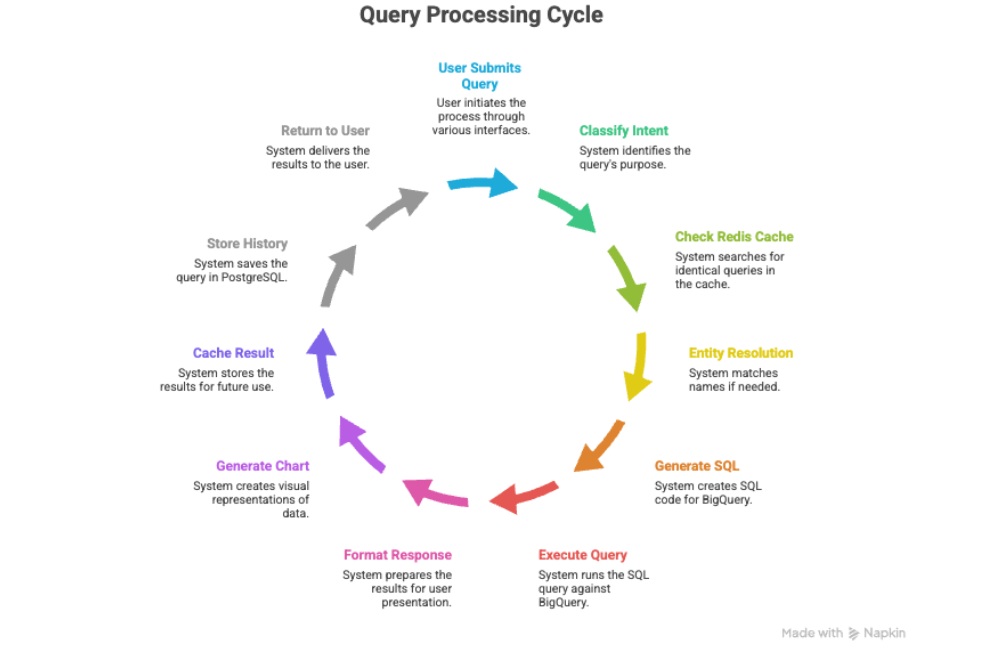
The whole cycle from a user query to response is depicted in the diagram below. Except for going through agentic flow with LangChain, some additional steps are conditionally executed, improving the speed (e.g., if the same question was already asked) or adding additional capabilities, such as generating a chart from the data received from BigQuery datastore.
Conversation persistence
For convenience and to gather insights into what users are actually asking our FinBot, we added a persistence layer in the form of a Postgres database, allowing us to improve our solution at later stages.
Each user can browse their conversation history and generate charts for the answers they previously received, or gain insights into what the actual query was against Google BigQuery. This gives us an audit trail we can use to improve in the future, but also allows us to jump straight into previous contexts and conversations.
Caching strategy
To reduce the cost associated with LLM calls, we implemented a simple caching strategy using Redis. It uses simple 1-hour TTL cache keys generated from normalized query + context and mainly serves the purpose of caching queries for entity resolution agents and allows cache-aware processing for follow-up questions. The cache gets invalidated on context change.
The transformation
The new way - natural language queries
Example transformations
Typical interaction
When using FinBot, users don’t need to modify the queries and construct them from scratch when trying to find out multiple pieces of information. With FinBot, you just follow a conversation, and the bot understands the context of previous queries, so it can automatically create new ones for you.
- User types: "How much did backend development cost in Q2 2025?"
- FinBot returns: "Backend development costs in Q2 2025: 125,430 PLN (April: 42,150 PLN, May: 48,280 PLN, June: 35,000 PLN)"
- User follow-up: "Which project had the highest?"
- FinBot (context-aware): "Project Alpha had the highest backend development costs at 32,500 PLN"
- Total time: ~10-60 seconds for each query
Real query examples
Simple queries
- "What's our total revenue for 2024?"
- "Show me costs for January"
- "List all projects in 2025"
Complex queries (now trivial)
- "Compare Q1 and Q2 margins for Backend guild"
- "Which specialties have negative margins this year?"
- "Top 10 contractors by sales rate in PLN"
Follow-up queries (context-aware)
- "How about for Q3?" (after Q2 query)
- "Break that down by month" (after yearly query)
- "What's their margin?" (after contractors list)
Time-savings calculation
Introducing the new query automation dramatically reduces the time required to run data requests. Individual queries now take 10-60 seconds instead of 15-20 minutes, resulting in an average ~97% reduction in time per query.
For a typical team member executing 10 queries per week, this translates to saving roughly 2.3-3.3 hours weekly, or about 2.8 hours on average.
Scaled to the organization (20 people using the system), the improvement yields substantial productivity gains:
- ~56 hours saved per week
- ~224 hours saved per month
- ~2,900 hours saved annually, equivalent to ~1.4 full-time employees of regained capacity.
These results demonstrate that even small per-query improvements compound into meaningful organization-wide efficiency gains.
Adoption & results
Rollout strategy
Like with many new products, a phased rollout was chosen to ensure UX quality, mitigate risks, and gather feedback before scaling. In the case of FinBot, it was especially important to test the multi-agent architecture with a small and expert user group first (the finance team and our beloved CFO in the first place).
One of the early goals was to validate the correctness of SQL generated by the SQL Agent. We display those SQL queries in full on the side of the FinBot window (when using the web-based version) for easy access.
Another important aspect was to test entity resolution (especially for names, projects, specialities, divisions, etc). Entity resolution had to be tested with multiple scenarios (mispelling, different orders, partial words, etc).
Next phases included the so-called “managers rollout” to get more people from other divisions like sales or marketing, to test the FinBot, gather additional insights on the queries they are interested in, and the like.
The full organizational rollout was the last phase and included some preparations on the development team side, like building a demo for users to watch and learn, making sure the Google SSO works across the company, and final touches to UI/UX for an even better final experience.
Metrics we looked at
To understand how FinBot was being used and where it brought the most value, we started collecting a few simple usage and performance metrics. These were not meant to be exhaustive analytics, but rather a way to validate whether the tool actually solved the problems described earlier and how it behaved under real-world load.
Usage metrics
- Number of queries per day/week
The query volume increased as non-technical users grew confident in asking more complex questions. We observed recurring patterns, including peaks around month-end closings and during project profitability reviews. This validated the assumption that many people had been avoiding data exploration simply because SQL was a barrier.
- Most common query types
The majority of questions clustered around a few categories:
- Project-level profitability
- Revenue, costs, and margins for specific time range
- People- and guild-level metrics
- Period comparisons (Q1 vs Q2, year-over-year)
These mapped almost identically to the pain points we described in the earlier chapters.
- Average response time
Response times consistently fell within the 10–60 second range, depending on the complexity of the question, and whether the result came from cache. Compared to the previous 15–20 minute workflow, the improvement was obvious the moment users tried it.
Qualitative feedback
- Users no longer depend on “SQL-capable” people
One of the most visible cultural changes was the disappearance of routine questions directed at the CFO or engineers. People who previously avoided BigQuery entirely were now running their own analysis.
- Decision-making sped up
PMs reported that preparing for client conversations became significantly faster. Finance could validate margins or budgets during meetings instead of waiting for someone to produce SQL results.
- People enjoy the conversational flow
Follow-up questions like "...and for Q3?" or "Please, break it down by month" felt natural and removed the friction of rewriting full queries or navigating the BigQuery console.
Overall, the metrics and feedback confirmed that FinBot was not just technically working - it was changing how people interacted with financial data on a daily basis.
Technical challenges and solutions
Some of the challenges we have encountered are already mentioned throughout the article, as they were highly influential in making architectural choices during development iterations. Nevertheless, I will list some of the most notable ones below, along with a brief description of the problem and an explanation of how they were resolved.
Challenge: Ambiguous entity names
This is the most common problem, affecting most of the queries. Users have no idea what the data looks like in our BigQuery dataset so once SQL Agent constructs the query if it ends up with employee = "Kowalski" it will find nothing. The problem is that "Kowalski" can match multiple people, we could have "Krzysztof Kowalski" or "Kowalski Krzysztof" or maybe someone who actually is "Kowalsky" but we call him "Kowalski", cos why not.
As already mentioned in multiple places above, this problem was resolved with the Entity Resolution Agent. The Agent executes a fuzzy matching with confidence scores against the data we have for some entities, if it finds a record with enough confidence he will pass that as additional context further down the pipeline but if not, it can also ask users for clarification on what she/he meant when asking about some entity.
Challenge: Complex temporal queries
Another interesting problem emerged once we started using FinBot as a chatbot everyone is familiar with (like ChatGPT or Claude), you just ask follow-up questions, and you don’t think much how will that be handled in the backend to construct real SQL query against BigQuery dataset. You could ask about some data in Q3 2025, and then simply ask “and Q2”, and the bot should figure out what you mean.
For this ContextManager was created which extracts temporal context if needed and builds bigger and richer context for the SQL Agent using some cached data for the user session.
Challenge: Performance
There are a couple of pain points and bottlenecks we have to deal with when using our FinBot agentic system. Some of those bottlenecks are associated with the simple calls against LLM (with large context, system query, etc).
The bigger challenge is the dataset capabilities and how fast Google BigQuery can respond to sql queries. When the query gets complex, this eats up most of the request-response time frame for the overall user experience. Both of those problems are mitigated to a point with caching and async processing whenever possible, but you need to be aware that you can only be as fast as your datasource, so the problem persists while using BigQuery.
Future roadmap
FinBot is a new application in our internal apps portfolio, and we are in the process of collecting stats and other information on how users are using the app, what they are missing, and what they would like to have added in future releases. Some enhancement propositions include:
- Trend prediction and forecasting
- Excel/PDF export functionality
- Scheduled reports and alerts
- Dashboard administration
Scaling considerations
It would significantly enhance FinBot's capabilities once we expand the data sources and incorporate additional features, such as currency monitoring, exchange rates, and non-project-related accounting data. Those are not difficult to add, but they add another layer of knowledge to our bot, and those layers need to be tested by more people with more domain knowledge in those areas, etc.
Besides other data sources, it would also be beneficial to integrate it with other systems we have in place, such as ERP or financial software that various departments use. However, this is a future that is so blurry at the time of writing that we can skip that for now.
Conclusion
FinBot is a good example of how to expose your data to the wider audience using natural language queries. It utilises multi-agent architecture to enable specialized processing, adds some layers to help with complexity of the system, resolving entities, clarifying user questions, and responding in a timely manner.
Extending FinBot with more data sources and integration is not difficult but testing the outcomes and usefulness is where the real work begins in those kinds of projects.
How can we help you
If your organization struggles with slow access to data, complex SQL workflows, or dependency on a small group of experts, an agentic system like FinBot can unlock true self-service analytics for your teams.
At SoftwareMill, we help companies design and implement custom AI assistants tailored to their data sources, business language, and security requirements.
Whether you want to build a natural language interface to BigQuery, ERP, or any internal dataset, we can guide you from concept through architecture, implementation, and rollout. Get in touch with us to discuss how we can help turn your data into instant insights.